No bank login, ever · 90 days of HelpFinance Pro and 10 AI credits included · 7-day free trial, no credit card · 14-day money-back guarantee
Real-time liquidity$134,887.54Total liquid money
Real-time net savings$30,232.79Savings this year
Month balance$4,451.69Income − expenses, this month
Total view+97.20%vs starting capital
Get the highlights.
Real-time liquidityOne live number for all your liquid money.
Starting capital plus every movement, updated the moment anything changes. Day, Week, Month, Year and Total views.
PlanningSet the budget. The 50/30/20 split computes itself.
Seven categories, three buckets, a Remaining margin that never lies and a smart suggestion that reads your plan instantly.
GoalsSee what your monthly saving becomes.
Year by year, with compound interest and without it, in real value after 2% inflation.
WalletOne wallet per goal, compared year over year.
Emergency fund, travel, a down payment: deposits month by month, withdrawals, and the year-over-year change.
AutomationMonths close themselves.
Recurring items and paid due dates post into Movements on their own date. The Yearly summary builds itself.
Eight liquidity modules. One live number.
You don't have a money problem. You have a visibility problem.
Your starting capital plus every movement you record: one figure, always exact. Around it, a plan that splits itself, compounding goals and months that close on their own.
0liquidity modules, one workspace
0live horizons: Day, Week, Month, Year, Total
0currencies and 10 languages, Arabic in full RTL
0bank logins required. Ever.
01Liquidity dashboard
Your liquid money, live, from your movements.
02Goals
What your monthly saving becomes, with and without interest.
03Planning
Set the budget. The 50/30/20 split computes itself.
04Wallet
One portfolio per goal, compared year over year.
05Recurring
Set it once. It posts itself on its date.
06Due dates
Every bill and tax, one tap from paid.
07Movements
Your monthly balance, automated.
08Yearly summary
Every year of your money at a glance.
Every module, one by one.
01Liquidity dashboard
Your liquid money, live, from your movements.
Total control of your liquid money, updated in real time from your movements. Income this month, Expenses this month, Month balance, Monthly work income. Real-time liquidity: TOTAL LIQUID MONEY with Day, Week, Month, Year and Total views and the change vs the previous period. Real-time net savings: Savings this year, vs previous month and previous year. Asset Allocation: the Needs / Fun / Savings pie from your plan. AI CFO analysis, 1 credit.
02Goals
What your monthly saving becomes, with and without interest.
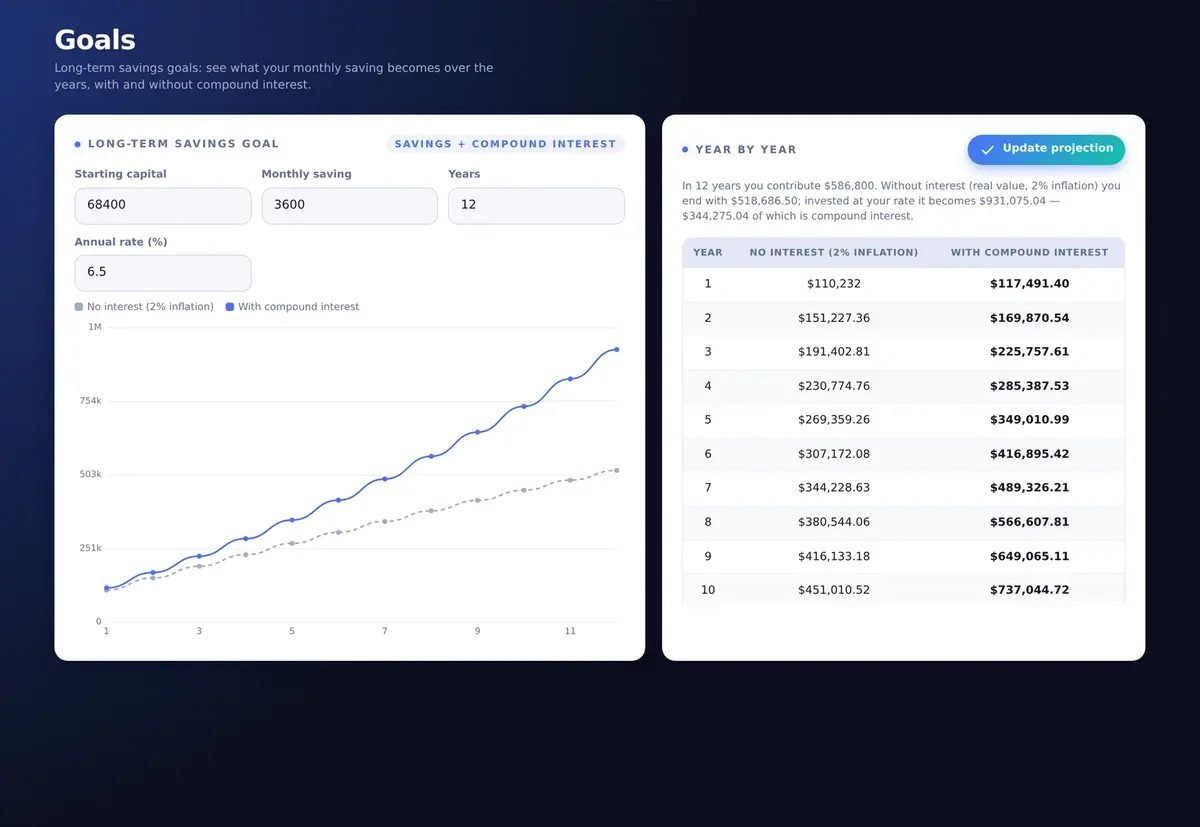
Long-term savings goals: see what your monthly saving becomes over the years, with and without compound interest. Starting capital, Monthly saving, Years (1–30), Annual rate (%). Chart No interest (2% inflation) vs With compound interest, the summary in plain words and the Year by year table.
03Planning
Set the budget. The 50/30/20 split computes itself.
The planning centre: set the monthly budget, distribute it across the categories and the Needs / Fun / Savings split computes itself. Total monthly budget; Home, Food, Transport, Unexpected, Debt, Fun, Savings; Planned total and Remaining margin. AI — Smart suggestion, free and instant. AI CFO analysis, 1 credit.
04Wallet
One portfolio per goal, compared year over year.
One portfolio per goal (Savings, Travel, Investments…): record deposits month by month and compare year over year. New wallet, Add deposit, Withdraw, All wallets total, Total per year, and the year-over-year % between two complete years.
05Recurring
Set it once. It posts itself on its date.
Recurring expenses in the three categories. They post into Movements automatically on their due date. Description, Category, Amount, Frequency (Monthly, Weekly, Quarterly, Yearly), Next posting, Active. Monthly equivalent and the comparison with your plan for Needs, Fun and Savings.
06Due dates
Every bill and tax, one tap from paid.
Everything with a date: bills, taxes, instalments routed from Loans. One tap marks it paid and posts the movement. Open amount, Overdue, Next 7 days; filters Open, Paid, All; statuses Paid, Overdue, Due soon, Upcoming.
07Movements
Your monthly balance, automated.
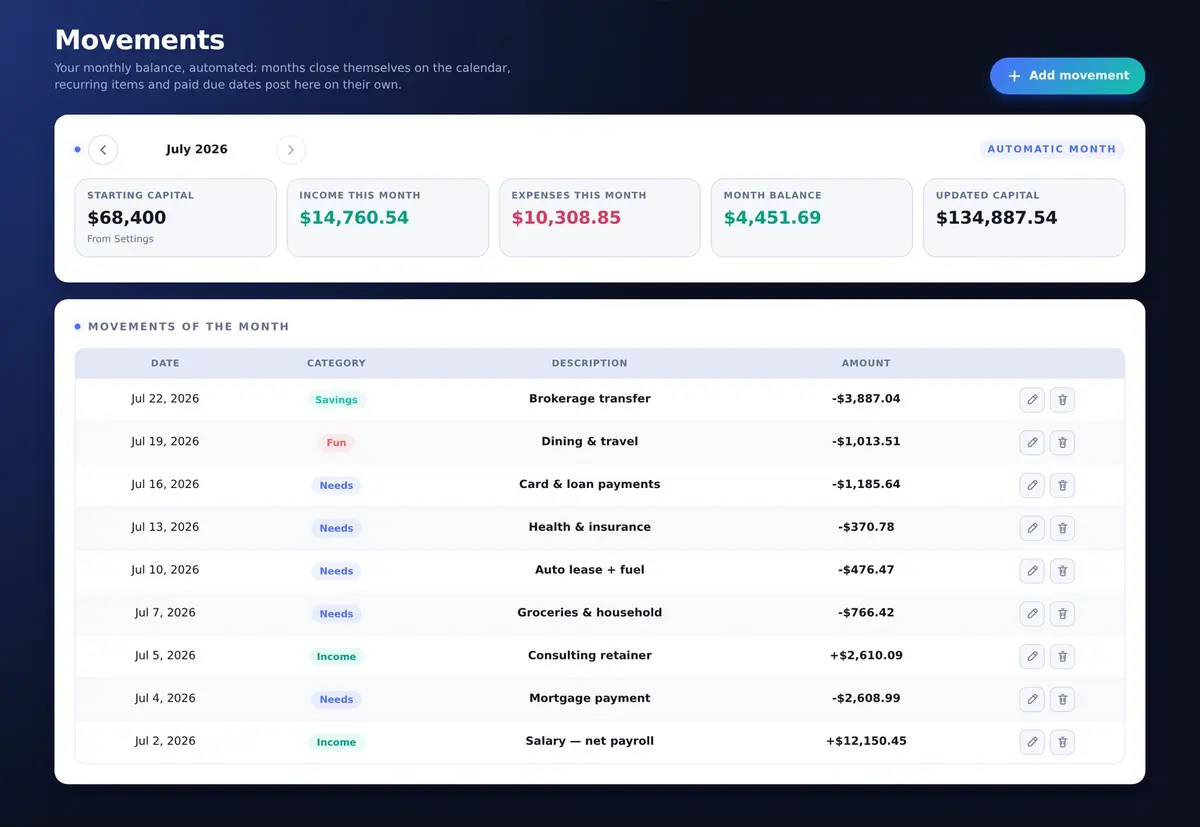
Your monthly balance, automated: months close themselves on the calendar, recurring items and paid due dates post here on their own. Starting capital, Income this month, Expenses this month, Month balance, Updated capital; Movements of the month with category and amount.
08Yearly summary
Every year of your money at a glance.
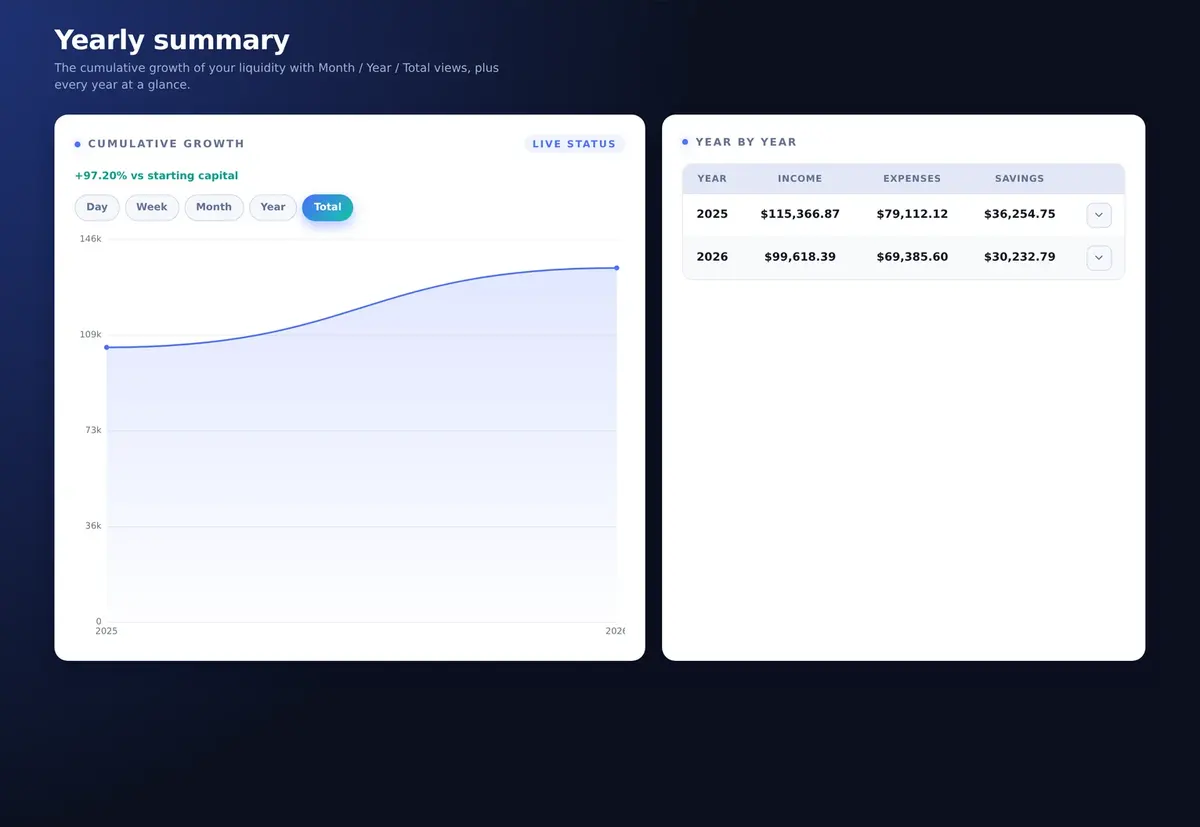
The cumulative growth of your liquidity with Month / Year / Total views, plus every year at a glance: Year, Income, Expenses, Savings, with the month detail one tap away.
Real screens of HelpFinance 5.0.1 with illustrative sample data. Every label on this page is the one you will find in the app. Tap + for the details.
Real-time liquidity
One live number for all your money. Watch it move.
Most money apps want your bank login. HelpFinance adds every movement you record to your starting capital: the total liquid money is always exact, and always yours.
Starting capital plus every movement.
Change an amount, untick a movement, add a new one: Income this month, Expenses this month, Month balance and the total liquid money recompute exactly as the Liquidity dashboard does, with the change vs your starting capital.
Total liquid money = starting capital + every movement you recorded
Expenses and savings transfers post as negative amounts, income as positive
Recurring items and paid due dates post themselves on their date
Live demo · the app's own formulas
Real-time liquidity
Live status
Starting capitalFrom Settings
Total liquid money—Updated automatically from your movements and starting capital.
—
Income this month—
Expenses this month—
Month balance—
Movements of the month
July 2026
DateDescriptionCategoryAmount
Jul 2Salary — net payrollIncome
Jul 4Mortgage paymentNeeds
Jul 5Consulting retainerIncome
Jul 7Groceries & householdNeeds
Jul 10Auto lease + fuelNeeds
Jul 13Health & insuranceNeeds
Jul 16Card & loan paymentsNeeds
Jul 19Dining & travelFun
Jul 22Brokerage transferSavings
Sample movements. Untick a line, change an amount or add a movement: every figure follows, exactly as in the app. Nothing is saved.
Planning · 50 / 30 / 20
Give every dollar a job. The split computes itself.
Set the budget, spread it over seven categories: HelpFinance sorts it into Needs, Fun and Savings, checks the 50/30/20 target and tells you the next move. Free, on your device.
Monthly spending plan
Personal budget
Set your monthly budget and distribute it across the spending categories.
Total monthly budgetHow much you can spend in total this month.
Needs—
HomeRent / mortgage, utilities
FoodGroceries
TransportFuel, season tickets, taxi
UnexpectedUnplanned extra expenses
DebtLoan and mortgage instalments
Fun—
FunCinema, restaurants, outings, hobbies
Savings—
SavingsMonthly set-aside
Planned total: —Remaining margin: —
Asset Allocation, computed from the Needs / Fun / Savings values of the monthly spending plan. Nothing is saved.
A suggestion that reads your plan.
Needs, Fun and Savings are measured against your budget. The suggestion updates on every keystroke and costs nothing: no AI credit, no connection, no data leaving your device.
AI — Smart suggestion
Analysis based on starting capital, total budget, spending categories and the monthly savings goal (50% needs, 30% fun, 20% savings).
Live demo · the app's own engine
Goals · compound interest
Your monthly saving, years from now.
Starting capital, monthly saving, years, rate: see what it becomes at your rate, and what it would be worth left idle after 2% inflation. Year by year.
Saving vs growing, in one chart.
The grey line is money left idle, eroded by inflation. The blue line is the same saving compounding month by month. The gap between them is the number that makes you start this month instead of next year.
Compound interest month by month, from 1 to 30 years
Real value without interest, eroded by 2% inflation a year
Year-by-year table, and the summary written in plain words
Live demo · the app's own projection
Long-term savings goal
Savings + compound interest
With compound interest——
You contribute—
No interest (2% inflation)—
Compound interest—
No interest (2% inflation)With compound interest
—
Year
No interest (2% inflation)
With compound interest
The app's own projection: real value eroded by 2% inflation a year; compound interest month by month. Indicative, not financial advice. Nothing is saved.
Automation · AI CFO
The month closes itself. Your AI CFO reads it.
RecurringSet it once. It posts itself.
Weekly to yearly items land in Movements on their date, measured against your plan.
Due datesEverything with a date, one tap from paid.
Bills, taxes, instalments. Overdue and next 7 days at a glance; Mark as paid posts the movement.
MovementsYour monthly balance, automated.
Months close themselves on the calendar. Starting capital, income, expenses, month balance and updated capital, month by month.
WalletOne portfolio per goal.
Deposits month by month, withdrawals, and the year-over-year change between complete years.
Yearly summaryEvery year at a glance.
Cumulative growth with Month, Year and Total views, and income, expenses and savings year by year.
AI CFO — analysis & action plan
Your AI CFO reads the live data of this page and returns measurable actions: amounts, percentages, deadlines. No fluff.
Run CFO analysis1 credit per analysis
What comes back
A headline and 3 to 5 key figures
Two to four titled sections of analysis
Action plan: title, impact, deadline
Sends only: totals, month flows and the Needs/Fun/Savings split. Anonymous, whitelisted server-side. The last analysis stays readable offline.
Six AI features. One shared balance.
Liquidity
AI CFO on the DashboardLiquidity, month flows, Needs/Fun/Savings
1 credit
Liquidity
AI CFO on PlanningBudget and category amounts
1 credit
Debt
AI CFO on the Debt dashboardDTI, thresholds, aggregated loan figures
1 credit
Debt
Early payoff planResiduals, instalments and rates
1 credit
Debt
Loan research AILive web research on real lenders, in your market
3 credits
Net worth
AI CFO on the Illiquid dashboardAsset category totals
1 credit
10 AI credits included, +10 with each module. Failed analyses refunded; credits never expire.
Two modules · one net worth
See yourself the way a bank does. Then see everything you own.
HelpFinance starts with liquidity. Two optional modules complete the picture: your debt read the way a lender reads it, and every asset you own in one number. Both are included in your first 90 days and in HelpFinance Pro; buy them once to keep them for life.
Debt moduleYour debt, read the way a lender reads it.
DTI against your country's bank range, a bank-grade profile, real amortization and an early-payoff plan.
$199.99 one-time+10 AI credits33 countries
Debt dashboard
Loans & mortgages
Rental income
Income sources
Loan research AI
Early payoff
Net worth moduleEvery asset you own, in one number.
Real estate, investments, businesses and goods with value history, composition and a live net worth.
$199.99 one-time+10 AI credits4 asset classes
Illiquid dashboard
Real estate
Convertible assets
Businesses
Convertible goods
Net worth
Debt-to-Income (DTI)
US · Local bank range 36–43%
CountrySettings › Geographic data
Net yearly work incomeCounted in full, no bank haircut
Rental incomeGross monthly · the bank counts ~70%
Income sourcesGross monthly · the bank counts ~70%
Monthly commitmentInstalments of all active loans
Effective monthly income—
New-instalment capacity—
Yearly commitment—
Debt-to-Income (DTI)—Share of your effective income absorbed by instalments—
Bank-grade debt profile—/100Payment behaviour (55%) + DTI position (45%) — how a lender scores you—
Instalments on time
Late / missed
The Debt module's own formulas and thresholds for 33 countries (a selection here). Organisational tool, not financial advice. Nothing is saved.
Your DTI against your country's bank range.
Pick a country, enter your income and instalments. Rent and non-payroll income count at 70%, as banks count them. The status, the new-instalment capacity and the bank-grade profile follow the Debt module's own rules.
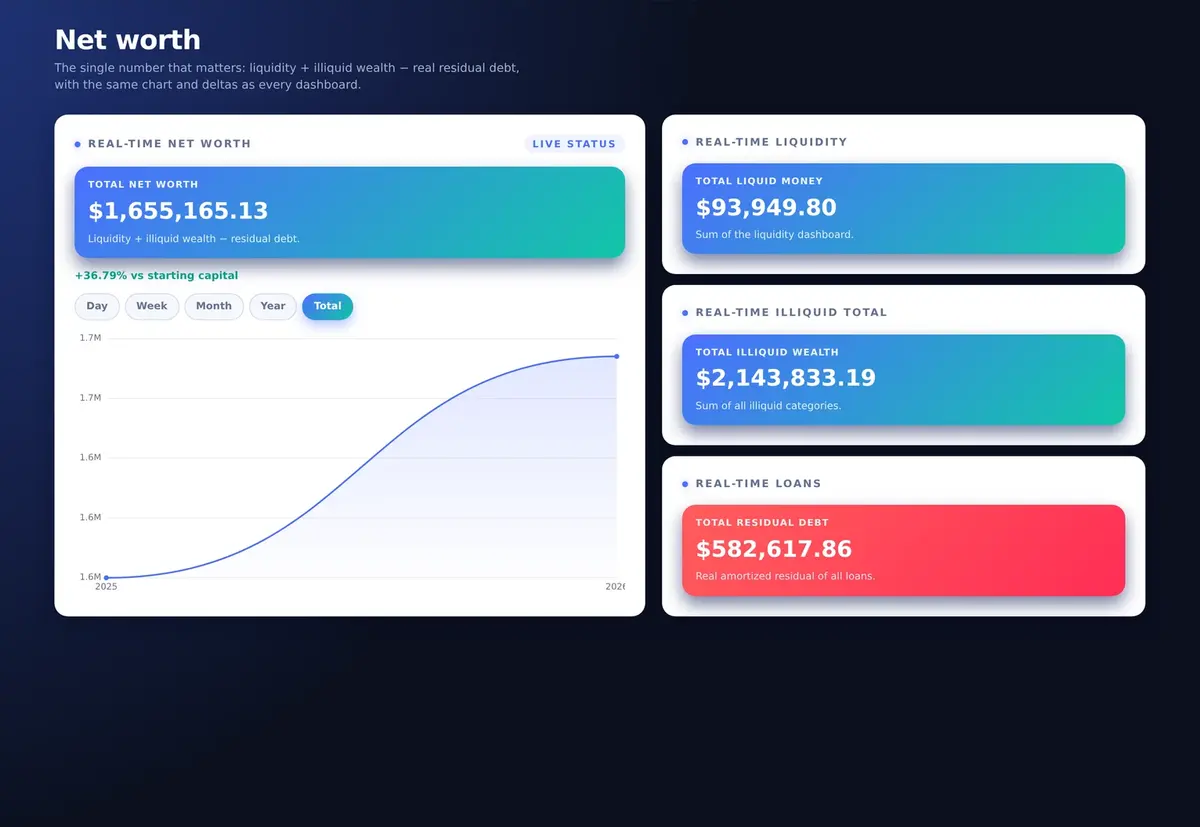
Liquidity+Illiquid wealth−Residual debt=Net worth
Real-time net worth
Net worth module
Total liquid moneySum of the liquidity dashboard
Total illiquid wealthReal estate, convertible assets, businesses, goods
Total residual debtReal amortized residual of all loans
Total net worth—Liquidity + illiquid wealth − residual debt.
Live demo · the modules' own formulas
Every screen. Every device.
One private finance app. Windows, macOS, iPhone, iPad, Android.
Install it once from the browser: it opens full-screen, works offline and starts instantly. Drag to turn.
Progressive Web App · Safari: Share → Add to Home Screen · Chrome and Edge: install icon in the address bar · AI analyses and purchases need a connection
Worth the switch?
What you get. What you leave behind.
Compared with the two ways most people track their money today.
HelpFinance5.0.1
Budgeting app
Spreadsheet
Price model
Pay once, own it
Monthly fee, forever
Free, then your evenings
Bank login required
Never
Usually
No
Where your data lives
Your device
Their servers
Wherever the file ends up
Live liquidity from your starting capital
Built in
Varies
Manual formulas
50/30/20 plan with instant suggestion
Built in, free
Rarely
Build it yourself
Compound-interest goals
Year by year
Sometimes
Build it yourself
DTI against local bank thresholds
Debt module, 33 countries
Rarely
No
Works offline
Yes
Usually not
Yes
Languages · currencies
10 · 22
Varies
Manual
“Budgeting app” and “Spreadsheet” describe general characteristics of those categories, not a specific product. HelpFinance figures are those of version 5.0.1.
Why HelpCore is the best place to get HelpFinance
Own it. Don't rent it.
Pay once, own it
Version 5.0.1 is yours for life, with 90 days of HelpFinance Pro included: every new version, in-app Assistance and the Debt and Net worth modules.
14-day money-back guarantee
If it doesn't earn its place in two weeks, one email gets you a full refund. No questions asked.
7-day free trial, no card
Liquidity, Debt and Net worth, every screen open for seven days. Nothing to cancel, nothing charged.
No bank login. Your device.
Your data lives in your browser's database, never on our servers. Export a full backup whenever you want.
Assistance from the makers
With HelpFinance Pro: send a request from the app, the answer arrives right there, from the people who build it.
Your language, your currency
10 languages and 22 currencies. The whole app, and every AI analysis, follows your choice.
One purchase. Total control.
Pay once. Keep it for life.
No required subscription. Version 5.0.1 is yours for life, with 90 days of HelpFinance Pro included, the Debt and Net worth modules unlocked too. After that, keep 5.0.1 or stay on the latest version with Pro, by choice.
One-time license
HelpFinance 5.0.1
Liquidity, planning, goals and automation. Pay once, yours for life.
$199.99one-time · lifetime license · 5.0.1
Lifetime use of HelpFinance 5.0.1: this version does not expire
All eight liquidity modules: Dashboard, Goals, Planning, Wallet, Recurring, Due dates, Movements, Yearly summary
90 days of HelpFinance Pro included: every new version and dedicated in-app Assistance
90 days of the Debt and Net worth modules, unlocked on the latest version
10 AI credits to start, 1 credit per AI CFO analysis, failed analyses refunded
When the included 90 days end, the app returns to version 5.0.1 with all your data intact, and the modules you did not buy lock
Stay on the latest version, by choice, with HelpFinance Pro: $99.99 a year or $9.99 a month, with the Debt and Net worth modules unlocked
Included: the eight liquidity modules, the Planning smart suggestion, backup export and import, 10 languages, 22 currencies. Included for your first 90 days and with HelpFinance Pro: the Debt module and the Net worth module; to keep them for life, buy them once inside the app ($199.99 each, +10 AI credits each). Optional: AI credit packs from $7.99 (10) to $199.99 (500).
Nothing to lose
Not convinced in 14 days? One email gets you a full refund. Your data stays on your device.
7-day free trial · No credit card
Not ready to decide? Take the whole suite for seven days.
Liquidity, Debt and Net worth: every screen unlocked for seven full days from your first sign-in. No card, nothing to cancel. If it doesn't earn its place, you close the tab.
1
Register
Name, email, country and the password you will use. No card field anywhere.
2
We confirm you personally
Every registration is reviewed by a human, so trial places go to real people.
3
Sign in and the 7 days begin
Same page, same email and password. The whole suite is already open.
8
And on day 8?
Nothing is charged, nothing renews: no card was ever collected. You pay only if you want to.
All three areas unlocked
Liquidity, Debt and Net worth, including the modules normally sold separately. Not a locked preview.
Your 7 days start at your first sign-in
Not at registration. Nothing is burning while you wait.
AI runs on credits
Trial balances start at zero: add a pack from $7.99 to run the AI CFO during the trial.
Take your numbers with you
Export a backup at any moment during the trial and import it into the full app.
No card required · Data stays on your device · Nothing auto-renews · One trial per email address
Still deciding?
Clear answers before you spend a dollar.
Is it really a one-time payment?
Yes. You pay once and version 5.0.1 is yours for life: no monthly fee and no required renewal to keep using it. Your purchase includes 90 days of HelpFinance Pro (every new version, in-app Assistance and the Debt and Net worth modules) and 10 AI credits.
Do I need to connect my bank?
No, never. HelpFinance works from your starting capital and the movements you record. Recurring items and paid due dates post themselves on their date, so the month keeps itself up to date without any bank credentials.
Where does my financial data live?
On your device, in your browser's database (IndexedDB). It is not uploaded to our servers. From Settings › Backup & data you can Export backup and Import backup whenever you want. AI analyses send only the anonymous figures listed in each panel's footer.
What exactly happens after 90 days?
Your app does not lock and your data is not touched. The included 90 days of HelpFinance Pro end and the app returns to the version you own, 5.0.1, which keeps working exactly as purchased, with your data and credits. The Debt and Net worth modules, included in the plan, lock unless you bought them. If you prefer to stay on the latest version with in-app Assistance and both modules, HelpFinance Pro renews them at $99.99 a year or $9.99 a month, by choice.
What do the Debt and Net worth modules add?
Both are included in your first 90 days and with HelpFinance Pro; to keep them for life, they are two one-time purchases inside the app, $199.99 each, each with 10 extra AI credits. Debt: Debt dashboard with DTI against your country's bank range and a bank-grade profile, Loans & mortgages with real amortization, Rental income, Income sources, Loan research AI and Early payoff. Net worth: Illiquid dashboard, Real estate, Convertible assets, Businesses, Convertible goods and Net worth.
How do the AI credits work?
1 credit = 1 AI analysis. The Loan research AI uses 3, because it runs a live web research across lenders. Failed analyses are refunded automatically and credits never expire. Packs: 10 for $7.99, 25 for $16.99, 50 for $29.99, 100 for $49.99, 200 for $89.99, 500 for $199.99. The Planning smart suggestion is free.
Does it work offline and across my devices?
HelpFinance is a Progressive Web App for Windows, macOS, iPhone, iPad and Android: the app works offline, while AI analyses and purchases need a connection. Each device keeps its own data; move it with an exported backup.
Which languages and currencies are supported?
10 languages: English, Italian, Spanish, German, French, Portuguese, Russian, Arabic (with full RTL), Chinese and Japanese. 22 currencies, including USD, EUR, GBP, CHF, CAD, AUD and JPY. The whole app shows the currency you choose; it does not convert between currencies.
Is this financial advice?
No. HelpFinance provides organisational and educational tools, and nothing in it, including the AI analyses, is financial, investment, tax or legal advice. Decisions about loans, investments and assets remain yours.
Our values
Built the HelpCore way.
Private by design.
No bank login, no cloud copy. Your finances stay on your device.
Clarity without false promises.
Real formulas and your own numbers. Never financial advice.
Software you own.
Pay once, keep the version you bought for life. No lock-in, no rent.
Total control starts with one number you can trust.
Your liquid money, your plan, your goals, and when you want them, your debt and everything you own. On your device, without a bank login.
Secure checkout · 14-day refund · Lifetime license · No recurring charge · 7-day free trial, no card
About this page. HelpFinance is a Progressive Web App by HelpCore.ai. Screens and figures shown here use illustrative sample data; the calculators are live demos and nothing you type is stored or sent anywhere.
No financial advice. HelpFinance provides organisational and educational tools. The figures, profiles and analyses are computed from the data you enter and can contain errors; they do not constitute certified accounting. Nothing in the app, including the AI analyses, is financial, investment, tax or legal advice: decisions about loans, investments and assets remain yours, and for binding decisions you should consult a licensed professional in your country.
License and credits. Your purchase is a lifetime license for HelpFinance 5.0.1 with 90 days of HelpFinance Pro and 10 AI credits included; while the plan is active, the Debt and Net worth modules are unlocked too. When the included period ends, the app returns to version 5.0.1 and keeps working with all your data, and the modules you did not buy lock; HelpFinance Pro ($99.99 a year or $9.99 a month) is optional, keeps you on the latest version and keeps both modules unlocked while active. The Debt and Net worth modules (to keep them for life) and AI credit packs are sold separately inside the app. Prices in USD; applicable taxes may be added at checkout. The 14-day money-back guarantee and the 7-day free trial follow the conditions published on the Support page.