7-day free trial, no credit card · 14-day money-back guarantee · No required subscription · Your data stays on your device
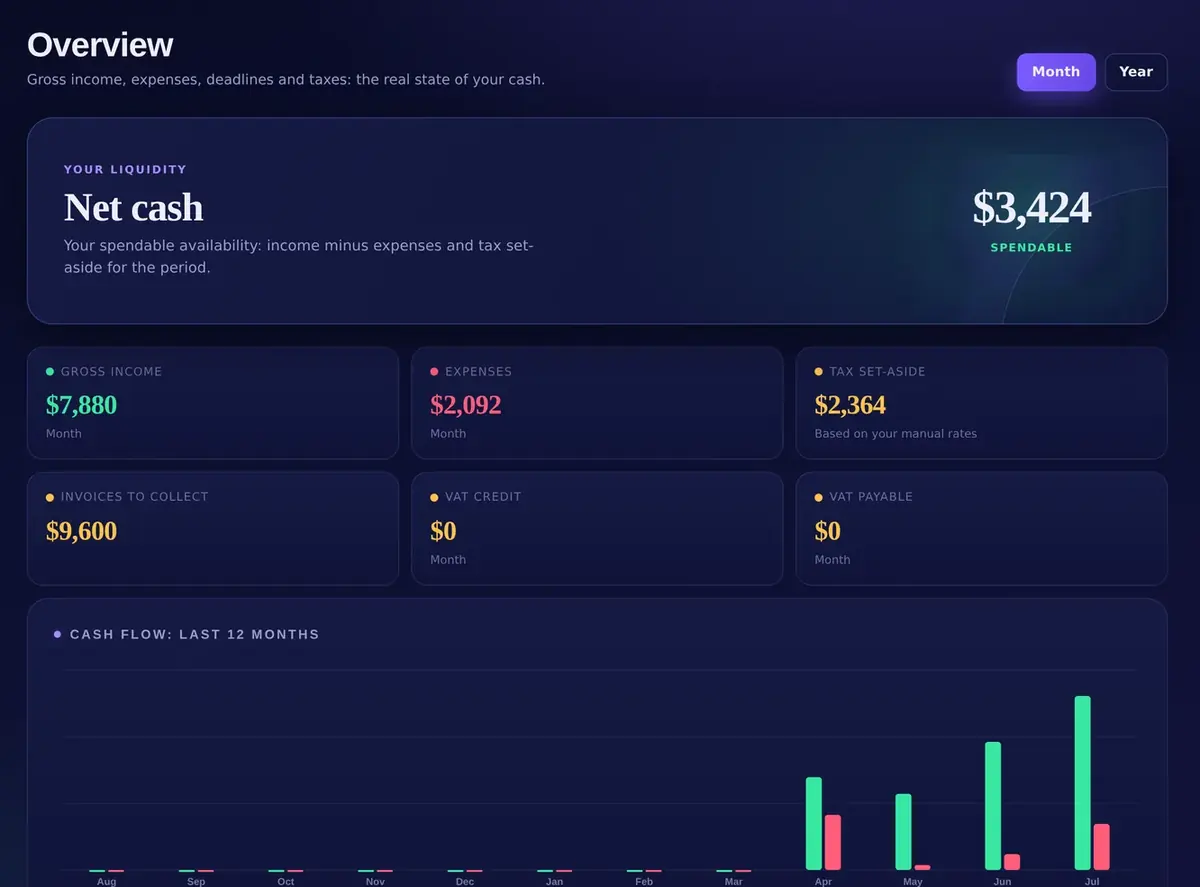
Your liquidity · Net cash$3,424Spendable
Invoice INV-2026-0012$2,400.00Paid
Recommended rate$61/hRed zone below $49
Tax set-aside$2,364Based on your manual rates
Get the highlights.
SpendableOne number tells you what is truly safe to spend.
Income, expenses and tax set-aside, separated. Net cash, live, before you spend it.
Rate calculatorYour floor. Your number. Your project price.
Real costs, real capacity, the pay you want. A rate you never go under and a price you say without flinching.
Invoices & quotesFrom client to paid, before momentum fades.
Type a name or a code: numbering, dates, VAT and totals fill themselves in. Draft, Sent, Paid, Overdue. PDF in one tap.
Deadlines & recurringSee what is due before it becomes urgent.
Rent, retainers, quarterly taxes: set them once, HelpFreelance posts them on schedule and keeps them in view.
Privacy by architectureYour business data stays yours. Full stop.
Everything lives in your browser's database on your device. No cloud copy, no bank login, backups you control. Works offline.
Nine tools. One source of truth.
Change one number. The rest of your business catches up.
Add an income once and your cash position moves. Pick a client and the invoice is half built. Set a recurring expense and it stays visible before it becomes a surprise.
0connected tools, one workspace
0interface languages, Arabic in full RTL
0currencies for clients anywhere
$0required monthly fees. Pay once.
01Overview
Income, expenses, deadlines and taxes: the real state of your cash.
02Movements
Record and manage every income and expense in one place.
03Clients
Everything about who pays you: one tap away from an invoice.
04Invoices & quotes
Type a name or a code: everything else fills itself in.
05Rate calculator
Every lowball quote is a tax you pay yourself. Know your floor.
06Deadlines
Record and keep every deadline under control.
07Recurring automations
Rules that post income, expenses and deadlines automatically.
08Sales receipts register
Monthly or annual register of revenue, VAT and conversions.
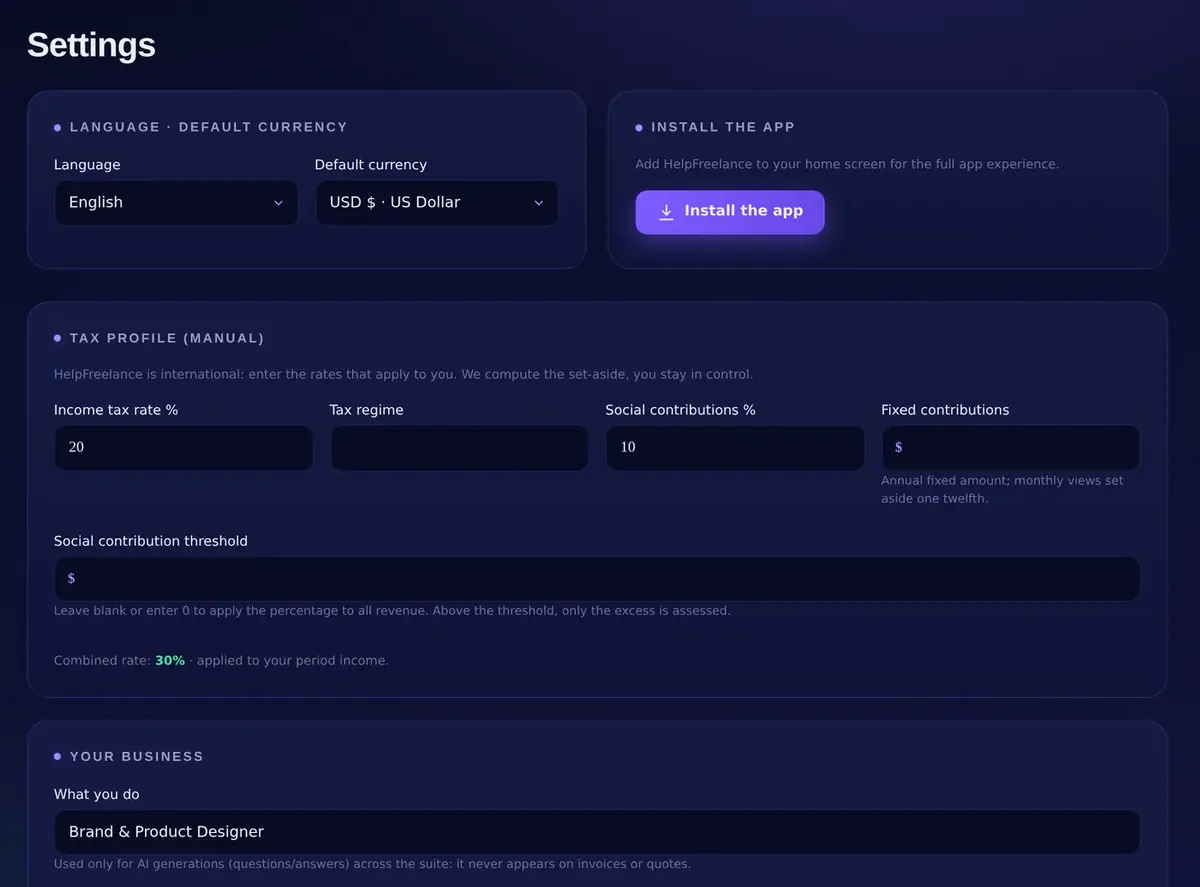
09Settings & tax profile
Language, currency, install, backup and the rates behind your set-aside.
Every tool, one by one.
01Overview
Income, expenses, deadlines and taxes: the real state of your cash.
Month and Year views. KPIs: Gross income, Expenses, Net cash, Tax set-aside, VAT credit, VAT payable, Invoices to collect. A 12-month cash-flow chart, and the Spendable figure that comes from your own Tax profile.
02Movements
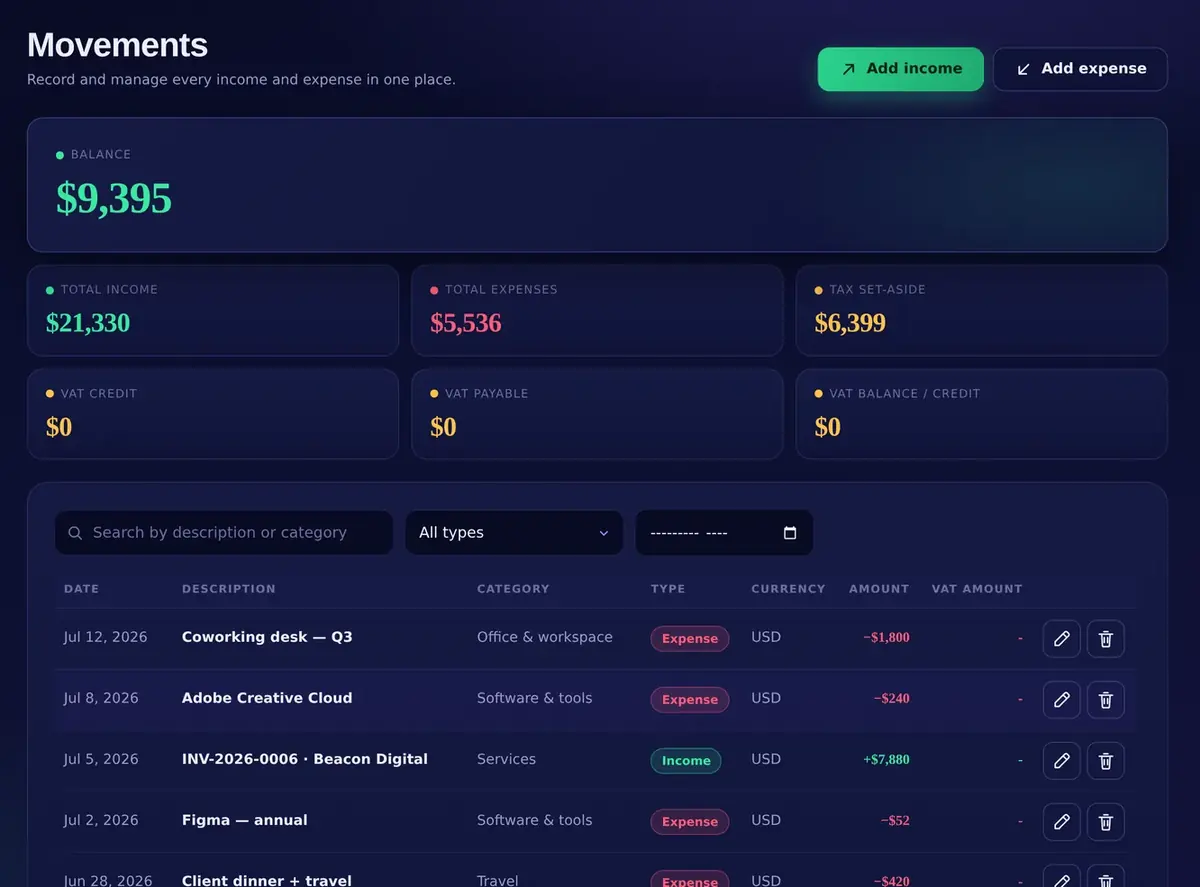
Record and manage every income and expense in one place.
Type, category, currency, VAT amount, date. Instant totals: Total income, Total expenses, Balance, VAT balance / credit. Search by description or category, filter by type and date range.
03Clients
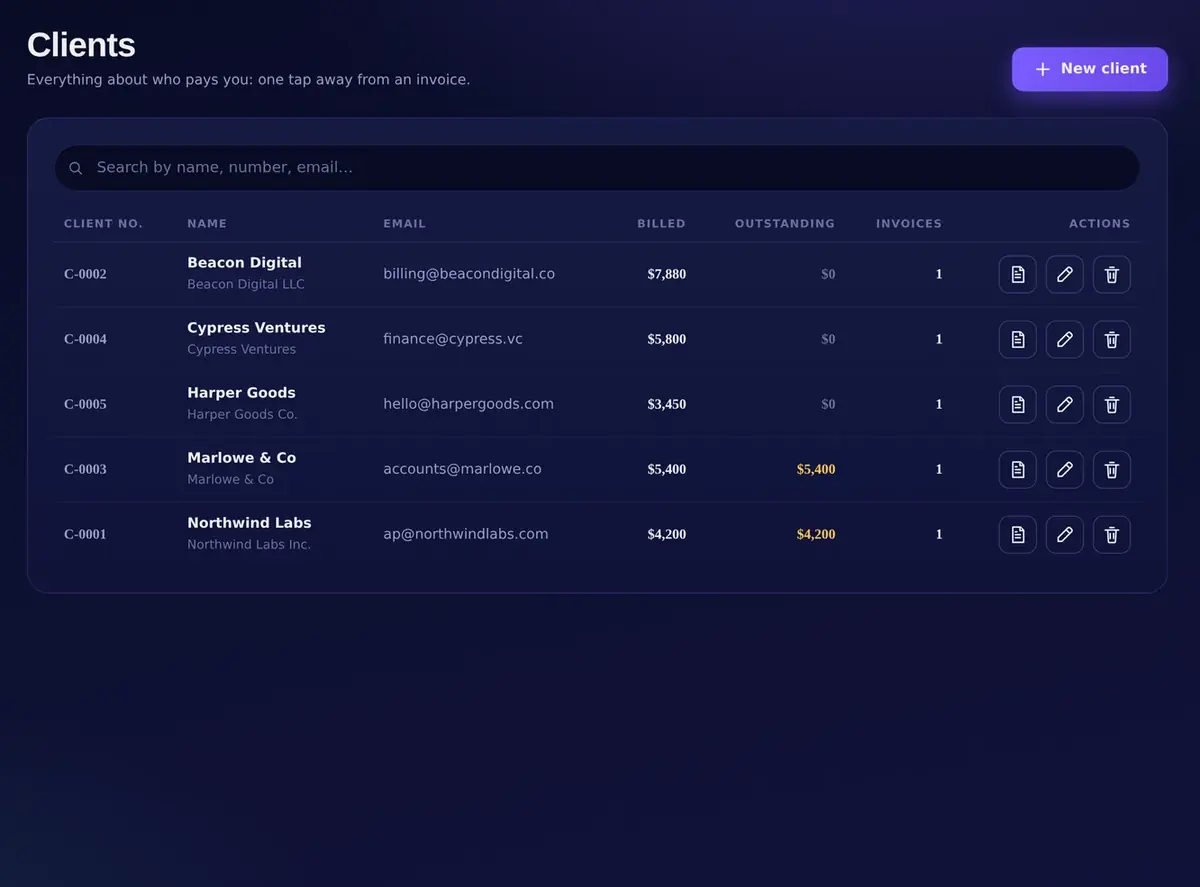
Everything about who pays you: one tap away from an invoice.
Client no., company, VAT ID, tax code, address, default hourly rate, payment terms, notes. Billed, Outstanding, Last invoice and the number of invoices, with New invoice one tap away.
04Invoices & quotes
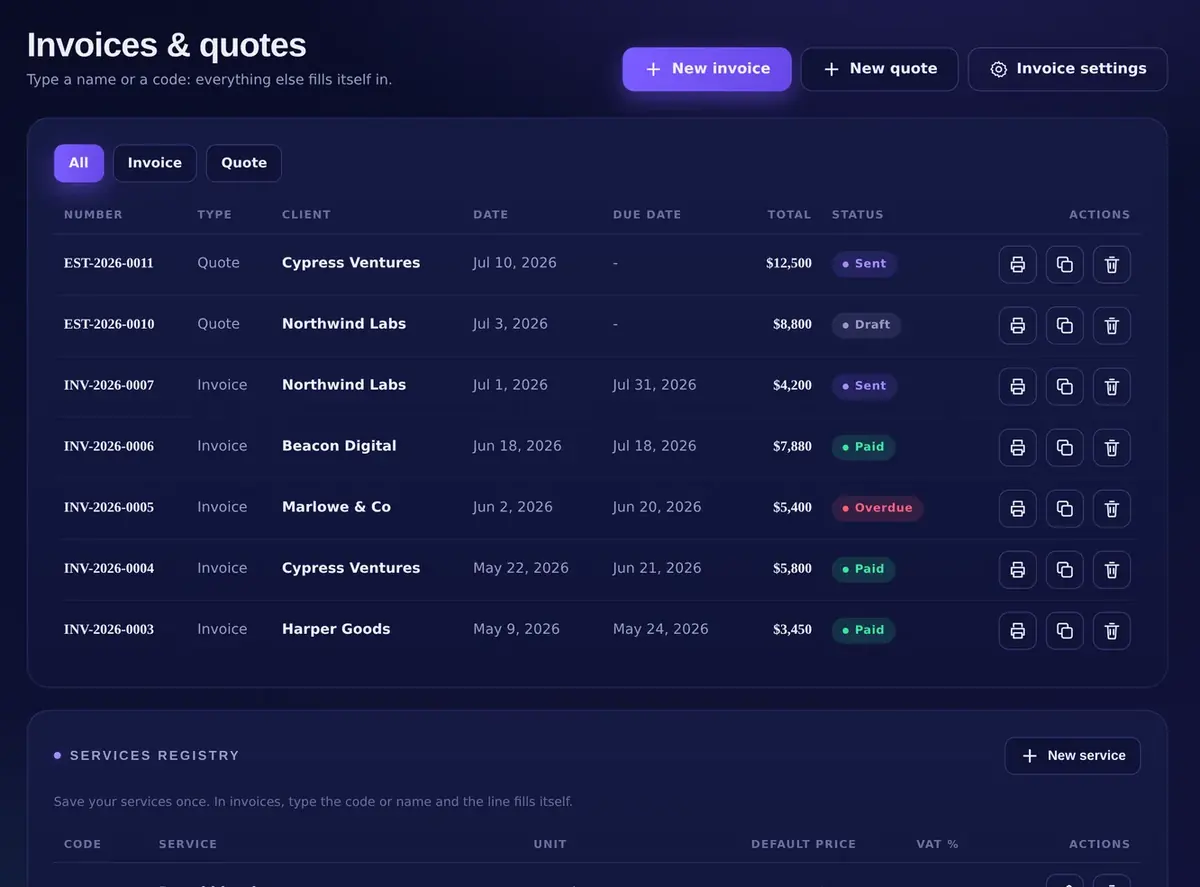
Type a name or a code: everything else fills itself in.
Invoice or Quote, automatic numbering, issue and due dates from the client's terms, VAT and withholding, discount, status Draft · Sent · Paid · Overdue, professional PDF export, and a Services registry with unit and default price.
05Rate calculator
Every lowball quote is a tax you pay yourself. Know your floor.
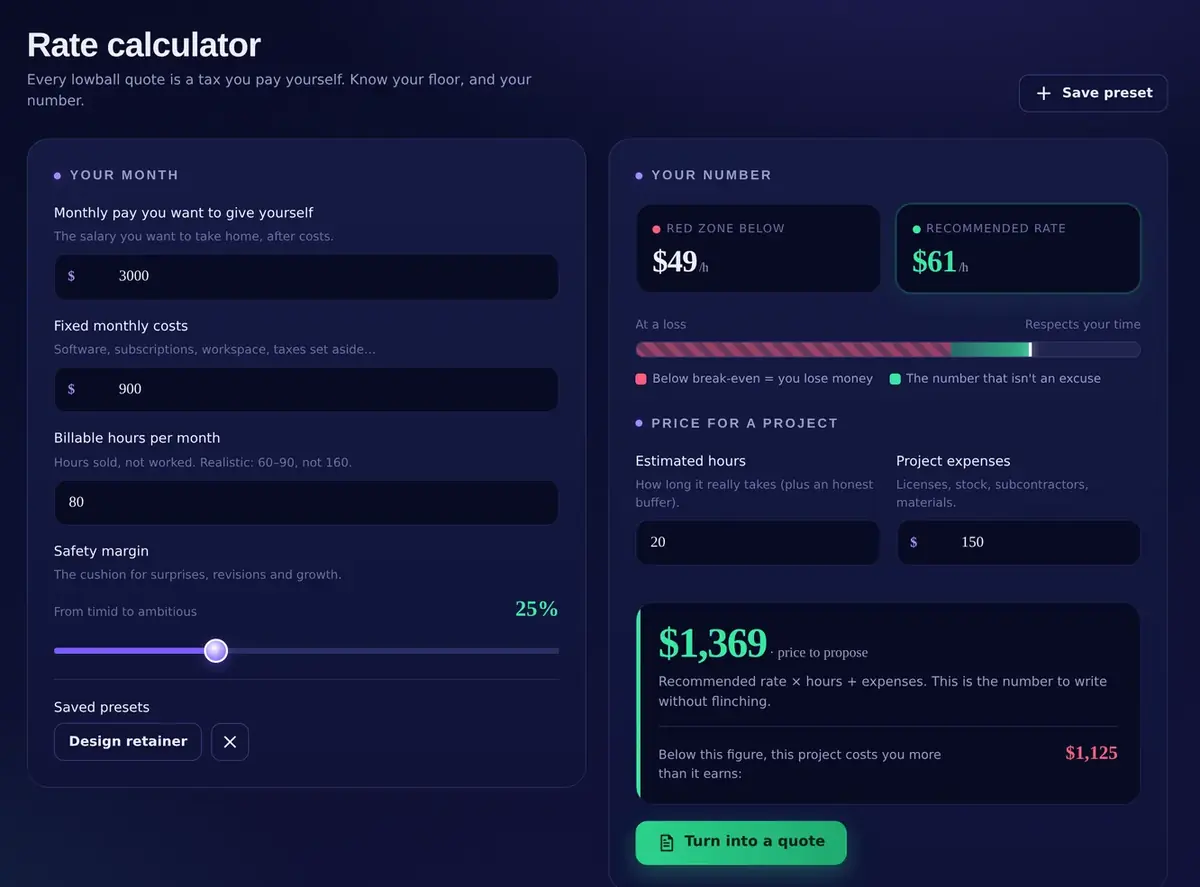
Monthly pay, fixed costs, billable hours, safety margin. Red zone below, Recommended rate, fairness gauge, price for a project with its redline, saved presets, Turn into a quote.
06Deadlines
Record and keep every deadline under control.
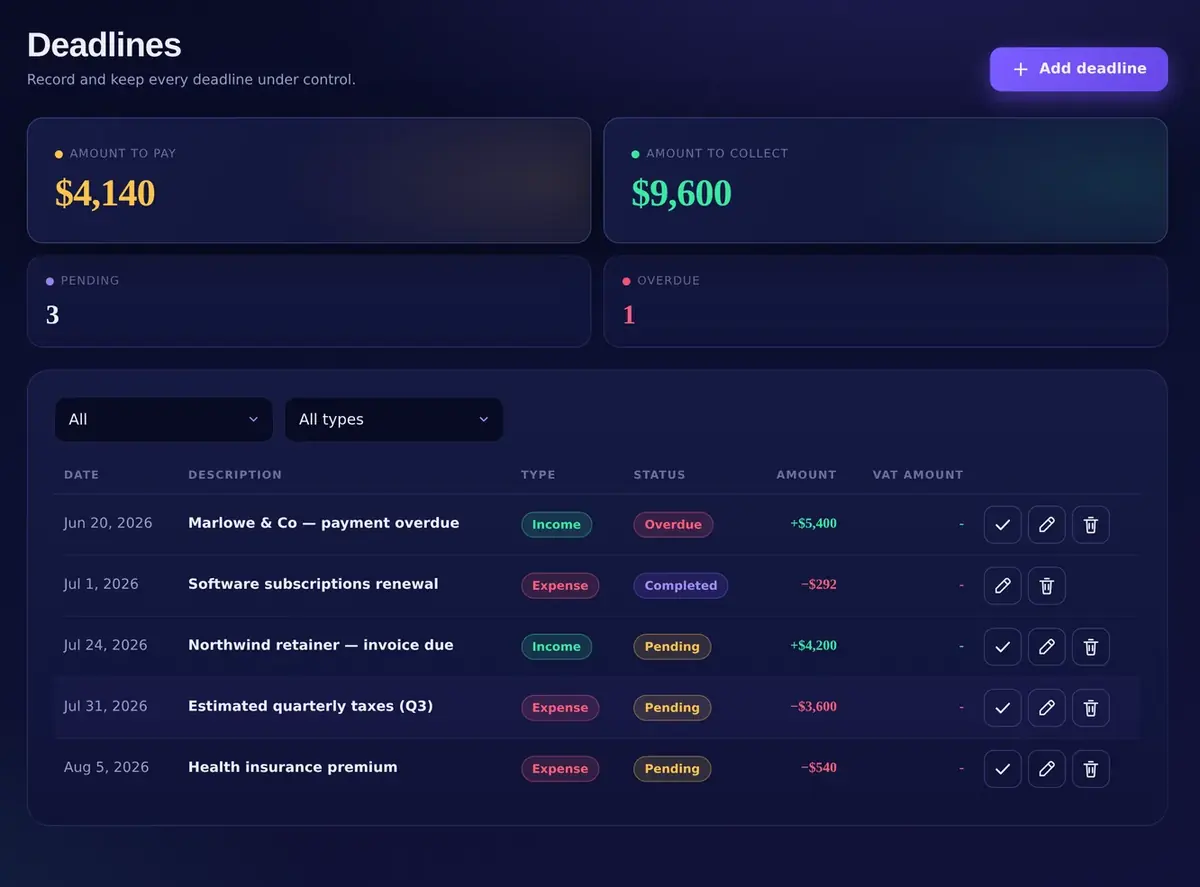
Amount to pay, Amount to collect, Pending, Overdue, Completed. Every deadline with type, amount and VAT, filterable, and fed automatically by recurring rules and unpaid invoices.
07Recurring automations
Rules that post income, expenses and deadlines automatically.
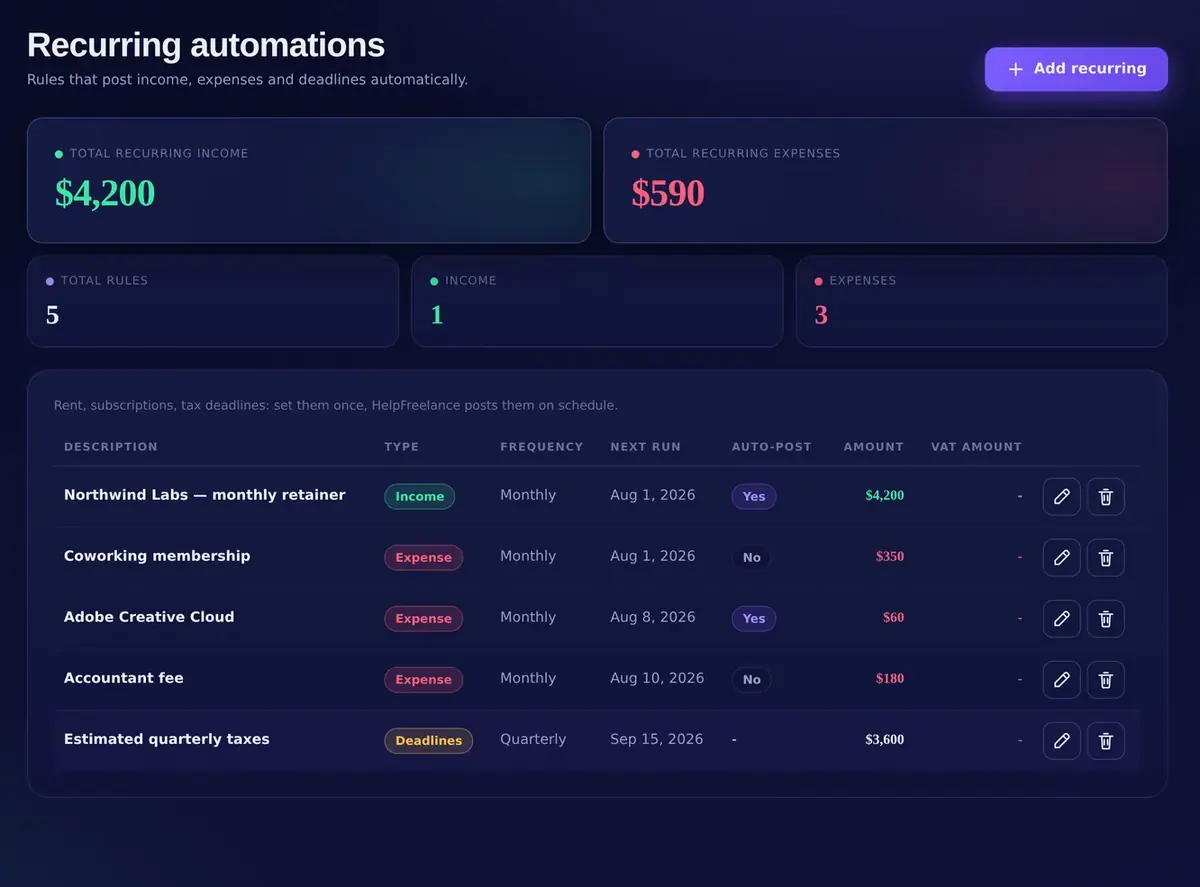
Weekly, monthly, quarterly, yearly. Next run, Post automatically on or off (off = only a reminder in Deadlines). Total recurring income and expenses, always in view.
08Sales receipts register
Monthly or annual register of revenue, VAT and conversions.
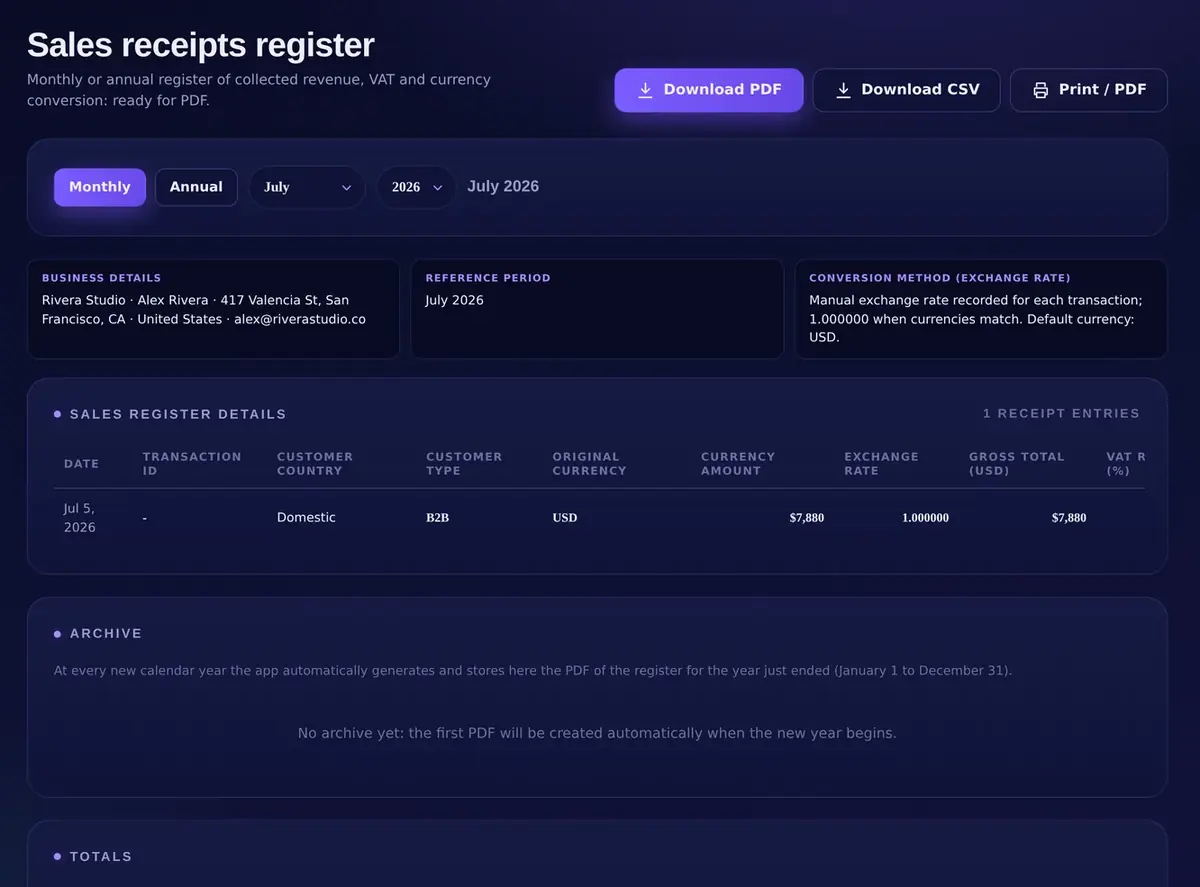
Business details, reference period, conversion method with the exchange rate recorded per transaction, totals. Download PDF, Download CSV, Print. Yearly archive generated automatically on January 1st.
09Settings & tax profile
Language, currency, install, backup and the rates behind your set-aside.
Language and default currency, Install the app, Backup & data (Export backup, Import backup), Delete all data, Tax profile (manual): income tax rate, social contributions, threshold, fixed contributions, and your business details for invoices.
Real screens of HelpFreelance 5.0.1 with illustrative sample data. Every label on this page is the one you will find in the app. Tap + for the details.
The number that changes the day
See what is truly safe to spend. Before you spend it.
Most freelancers look at a bank balance and guess. HelpFreelance separates income, expenses and tax set-aside into one figure: Net cash. Try it with your numbers, nothing is saved.
Open the app. See the number. Decide.
Gross income, Expenses, Net cash, Tax set-aside, VAT and Invoices to collect, for the month or the year, with a 12-month cash-flow trend. The set-aside comes from your own Tax profile: you enter the rates that apply to you, the app does the math every time a movement changes.
Net cash = income − expenses − tax set-aside, live
Tax money visible and separate, never mixed with cash you may already be planning to spend
Month and Year views, 12-month cash-flow chart, invoices still to collect
Live demo · nothing is saved
Overview
Month · USD $
Gross income, expenses, deadlines and taxes: the real state of your cash.
Your month
Tax profile (manual)
Annual amount, one twelfth per month
Your liquidity · Net cash · Spendable—
Balance (income − expenses)—
Tax set-aside—
Combined rate—
Available after set-aside—
Suggested set-aside this month, applied to your period income. In the app, every movement updates these figures automatically. Indicative estimate, not tax advice.
Rate calculator
Do not let pressure write your price.
Every lowball quote is a tax you pay yourself. The Rate calculator turns your costs, your capacity and the pay you want into a floor you never go under and a number you can say without flinching.
Rate calculator
Save preset · Turn into a quote
Every lowball quote is a tax you pay yourself. Know your floor, and your number.
Your month
The salary you want to take home, after costs.
Software, subscriptions, workspace, taxes set aside…
Hours sold, not worked. Realistic: 60–90, not 160.
The cushion for surprises, revisions and growth.
From timid to ambitious25%
Your number
Red zone below—/h
Recommended rate—/h
At a lossRespects your time
● Below break-even = you lose money● The number that isn't an excuse
Price for a project
How long it really takes (plus an honest buffer).
Licenses, stock, subcontractors, materials.
—· price to propose
Recommended rate × hours + expenses. This is the number to write without flinching.
Below this figure, this project costs you more than it earns:—
Turn into a quoteSave preset
Indicative estimate, not tax or financial advice. In the app, “Turn into a quote” opens a new quote with these figures already filled in.
Your floor. Your number. Your project price.
Three inputs you already know, one slider for the cushion, and the app gives you the red zone, the recommended rate and the exact price to write on the next quote, with the redline under which a project costs you more than it earns.
Save presets for different kinds of work; review your rate every quarter
One tap: Turn into a quote, with hours and rate already in the lines
Live demo · the app's own formulas
From client to paid
Turn finished work into a polished invoice before momentum fades.
Pick a client, pick a service, and the invoice is half built: number, dates, VAT, totals. Track Draft, Sent, Paid and Overdue at a glance, then export a professional PDF. Build one now.
Type a name or a code. The rest fills itself in.
Clients carry their VAT ID, address, default hourly rate and payment terms. Services live in a reusable registry with unit and default price. Invoices and quotes get automatic numbering, due dates from the client's terms, VAT and withholding, and a PDF that looks like it came from a studio, not a spreadsheet.
Invoices and quotes, automatic numbering, professional PDF export
Draft · Sent · Paid · Overdue, and “Invoices to collect” on the Overview
Client records with Billed, Outstanding and Last invoice, one tap from New invoice
Live demo · nothing is saved
Invoices & quotes
New invoice
Type a name or a code: everything else fills itself in.
INV-2026-0012Rivera Studio · Alex Rivera · alex@riverastudio.co
Draft
Bill toBeacon DigitalC-0002
Issue date—Due date—
Description
Qty
Unit
Amount
Brand identity
1
$2,400.00
$2,400.00
Subtotal—
Calculated VAT (0%)—
Total—
Generated with HelpFreelance · Payment terms: 30 days
Mark as sentExport PDF
In the app the PDF is one tap away and the invoice status feeds the Overview, the Deadlines and the client's Outstanding balance.
Print-ready. Every time.
The PDF your client receives looks like it came from a studio.
The app's own print layouts for Invoice, Quote and the Sales receipts register. Fill in the fields of Settings › Your business and of a client record: every page updates as you type. Nothing is saved.
Your business
Settings · Logo and details appear on every invoice and quote.
Brand logo
Client
Invoice & quote
DescriptionQtyUnit priceVAT %Disc. %
Live demo, nothing is saved. These fields exist only on this page and in your browser's memory for as long as it stays open. Your real settings live inside the app, on your device.
Download PDFDownload CSVPrint / PDFYearly archive, automatic on January 1st
Full A4 pages. Hover or tap a page to bring it to the front. Illustrative documents rendered from the app's own print layout with the data you type above. Nothing you enter is stored or sent anywhere.
Deadlines, recurring, register
Make tax time a handoff. Not a hunt.
DeadlinesSee what is due before it becomes urgent.
Amount to pay, amount to collect, pending and overdue, in one list. Nothing competes for your attention: it waits in line.
Recurring automationsAutomate what your future self should never have to remember.
Retainers, subscriptions, quarterly tax entries: weekly to yearly, posted automatically or only as a reminder.
Sales receipts registerA clean register, ready for your accountant.
Monthly or annual, with VAT, taxable amount and exchange rate. Download PDF, Download CSV, Print. Every new year, last year's PDF is archived by itself.
MovementsRecord it once. Let every total catch up.
Income and expenses with categories, currency, VAT amount and instant totals. Search, filter, done.
ClientsYour client record is already halfway to an invoice.
Billed, Outstanding and Last invoice at a glance, and New invoice one tap away.
Every screen. Every device.
One workspace. Windows, macOS, iPhone, iPad, Android.
Install it once from the browser and it opens full-screen, works offline and starts instantly. Drag to turn.
Progressive Web App · Safari: Share → Add to Home Screen · Chrome and Edge: install icon in the address bar
Worth the switch?
What you get. What you leave behind.
Compared with the two ways most freelancers run their numbers today.
HelpFreelance5.0.1
Spreadsheet
Typical cloud app
Price model
Pay once, own it
Free, then your evenings
Monthly fee, forever
Where your data lives
Your device only
Wherever the file ends up
Their servers
Bank login required
Never
No
Often
Spendable after tax set-aside
Live, automatic
Manual formulas
Rarely
Rate floor and project price
Built in
Build it yourself
Rarely
Invoices and quotes with PDF
Automatic numbering
Copy, paste, hope
Usually
Works offline
Yes
Yes
Usually not
Languages · currencies
10 · 24
Manual
Varies
“Spreadsheet” and “Typical cloud app” describe general characteristics of those categories, not a specific product. HelpFreelance figures are those of version 5.0.1.
Why HelpCore is the best place to get HelpFreelance
Own it. Don't rent it.
Pay once, own it
Version 5.0.1 is yours for life, with 90 days of Suite Pro included: every new version and in-app Assistance. Stay current afterwards only if you choose.
14-day money-back guarantee
If it doesn't earn its place in two weeks, one email gets you a full refund. No questions asked.
7-day free trial, no card
The whole suite, open for seven real days from your first sign-in. Nothing to cancel, because nothing was ever charged.
Your data on your device
Private by architecture: your numbers live in your browser's database, not in a profile built to monetize your activity.
Assistance from the makers
90 days of in-app Assistance included, then with Suite Pro: send a request from the app, the answer arrives right there, from the people who build it.
Built for business beyond one border
10 languages, 24 currencies, install on Windows, macOS, iPhone, iPad and Android. Works offline.
One purchase. The complete system.
Pay once. Keep it for life.
No required subscription. Version 5.0.1 is yours for life, and every new version released in your first 90 days is included. After that, keep 5.0.1 or stay on the latest version with Suite Pro, by choice.
One-time license
HelpFreelance 5.0.1
Pay once. Version 5.0.1 is yours for life. Stay on the latest version after the first 90 days only if you choose.
$199.99one-time · lifetime license · 5.0.1
Lifetime use of HelpFreelance 5.0.1: this version does not expire
All nine connected tools for cash, clients, pricing, invoices, deadlines and reports
90 days of Suite Pro: new versions, improvements, fixes and features
90 days of dedicated in-app Assistance
When the included 90 days end, the app returns to version 5.0.1 with all your data intact
Stay on the latest version, by choice, with Suite Pro: $99.99 a year or $9.99 a month
Included: Overview, Movements, Clients, Invoices & quotes, Services registry, Rate calculator, Deadlines, Recurring automations, Sales receipts register and reports, 10 languages, 24 currencies, backups. Optional, sold separately inside the suite: HelpClientFlow AI and HelpRetainer ($199.99 list each; both unlocked during the trial, your first 90 days and with Suite Pro) and AI credit packs. After the included 90 days, Suite Pro keeps you on the latest version, with Assistance and both add-on apps, at $99.99 a year or $9.99 a month, only if you want it. Without it, the app returns to 5.0.1 and keeps working.
Nothing to lose
Not convinced in 14 days? One email gets you a full refund. Your data stays on your device.
7-day free trial · No credit card
Not ready to decide? Take the whole suite for seven days.
Not a demo and not a locked preview: the complete suite, open for seven full days, with no card and nothing to cancel. If it doesn't earn its place, you close the tab and that is the end of it.
1
Register
Name, email, country and the password you will use. No card field anywhere.
2
We confirm you personally
Every registration is reviewed by a human, so trial places go to real people.
3
Sign in and the 7 days begin
Same page, same email and password. The whole suite is already open.
8
And on day 8?
Nothing is charged, nothing renews: no card was ever collected. You pay only if you want to.
The whole suite is unlocked
Every tool is open during the trial, including HelpClientFlow AI and HelpRetainer, the upgrades normally sold separately.
Your 7 days start at your first sign-in
Not at registration. Nothing is burning while you wait, so you get seven real days of use.
Same privacy as the paid app
Your working data lives in your browser on your device, no cloud copy, and you can export a full backup at any moment.
Minutes to your first real number
Pick your language and currency, add one income and one client: your Overview is already live.
No card required · Data stays on your device · Nothing auto-renews · One trial per email address
Still deciding?
Clear answers before you spend a dollar.
Will I ever be forced into a subscription?
No. You pay once and version 5.0.1 is yours for life: no monthly fee and no required renewal to keep using it. Your purchase also includes 90 days of Suite Pro: new versions, features, improvements and in-app Assistance; staying on the latest version after that is a choice, never a condition.
What exactly happens after 90 days?
Your app does not lock and your data is not touched. The included 90 days of Suite Pro end and HelpFreelance returns to the version you own, 5.0.1, which keeps working exactly as purchased, with all your records and backups. HelpClientFlow AI and HelpRetainer, if you used them only through the plan, lock until you subscribe or buy them. If you prefer to keep the latest version and in-app Assistance, Suite Pro renews them at $99.99 a year or $9.99 a month, by choice.
Where exactly does my financial data live?
Your working data is stored locally in your browser's database (IndexedDB) on the device you use. It is not uploaded to a remote financial database. You can export a complete backup whenever you choose, from Settings › Backup & data.
Can I protect or move my data?
Yes. Export a complete backup and store it somewhere you control. Use that file to restore your workspace or move your records to another device with Import backup, without depending on a third-party cloud account.
Does it work offline and across my devices?
HelpFreelance is a Progressive Web App for Windows, macOS, iPhone, iPad and Android, with an offline-ready core. Because your data is private and local, each device keeps its own working copy unless you move it with an exported backup.
Which languages and currencies are supported?
10 languages: English, Italian, Spanish, German, French, Portuguese, Russian, Arabic (with full RTL), Chinese and Japanese. 24 currencies, including USD, EUR, GBP, CAD, AUD and JPY. Switch any time in Settings.
Does HelpFreelance replace my accountant?
No, and that boundary is deliberate. HelpFreelance helps you organize invoices, working records, tax set-asides and reports. It does not replace professional accounting, legal or tax advice for your jurisdiction.
What support is included?
90 days of dedicated in-app Assistance included, then with Suite Pro: open Assistance in the app, send a request, and the answer arrives right there, from the people who build the product. Everyone can also write to support@helpcore.ai.
Our values
Built the HelpCore way.
Privacy is the architecture, not a setting.
Your numbers never leave your device unless you export them.
Clarity without false promises.
Records, scenarios and working numbers. It does not replace your accountant.
Software you own.
Pay once, keep the version you bought for life. No lock-in, no rent.
The cost of staying scattered is paid one small mistake at a time.
A forgotten due date. Tax money that looked spendable. A quote written from pressure. HelpFreelance makes the next decision visible before the expensive guess.
Secure checkout · 14-day refund · Lifetime license · No recurring charge · 7-day free trial, no card
About this page. HelpFreelance is a Progressive Web App by HelpCore.ai. Screens, figures and documents shown here use illustrative sample data; the calculators and print previews are live demos and nothing you type is stored or sent anywhere. HelpFreelance organizes your records and working numbers and does not provide tax, legal or accounting advice.
License. Your purchase is a lifetime license for HelpFreelance 5.0.1, with 90 days of Suite Pro (new versions and in-app Assistance) included. When the included period ends, the app returns to version 5.0.1 and keeps working with all your data; Suite Pro ($99.99 a year or $9.99 a month) is optional and keeps you on the latest version. Prices in USD; applicable taxes may be added at checkout. The 14-day money-back guarantee and the 7-day free trial follow the conditions published on the Support page.